insights
Supply Plan vs Replenishment: Which Inventory Plan Does Your Brand Need?
Hannah Astra, Director of Growth

Most brands start with one warehouse and a reorder spreadsheet. It works — until it doesn't.
You add a 3PL on the other coast. Then Amazon FBA. Then a retail partner, a co-manufacturer, maybe a second country. Suddenly the question isn't "How much should I buy?" anymore. It's "Where should every unit be, and when?"
That's the difference between replenishment and supply planning. And both are now built into Moselle for every customer.
In this guide, we'll cover:
- Why supply planning matters as your network grows
- How supply planning differs from replenishment and production planning
- A simple test for choosing the right plan
- What needs to be in place before you build
- Three ways Moselle's Supply Plan helps larger brands plan transfers, protect safety stock and put AI to work
Why supply planning matters
A great forecast only pays off if the stock is in the right place at the right time. Supply planning is what turns your demand plan into action: what to buy, what to make and what to move.
Without it, growing brands run into the same problems again and again:
- Stockouts in one location, overstock in another. Your total inventory looks healthy, yet the warehouse serving your best channel runs dry. Buying more treats the symptom. Moving stock fixes the cause.
- Cash tied up in the wrong place. Every unit you didn't need to buy — because you could have transferred it — is cash that stays in your business.
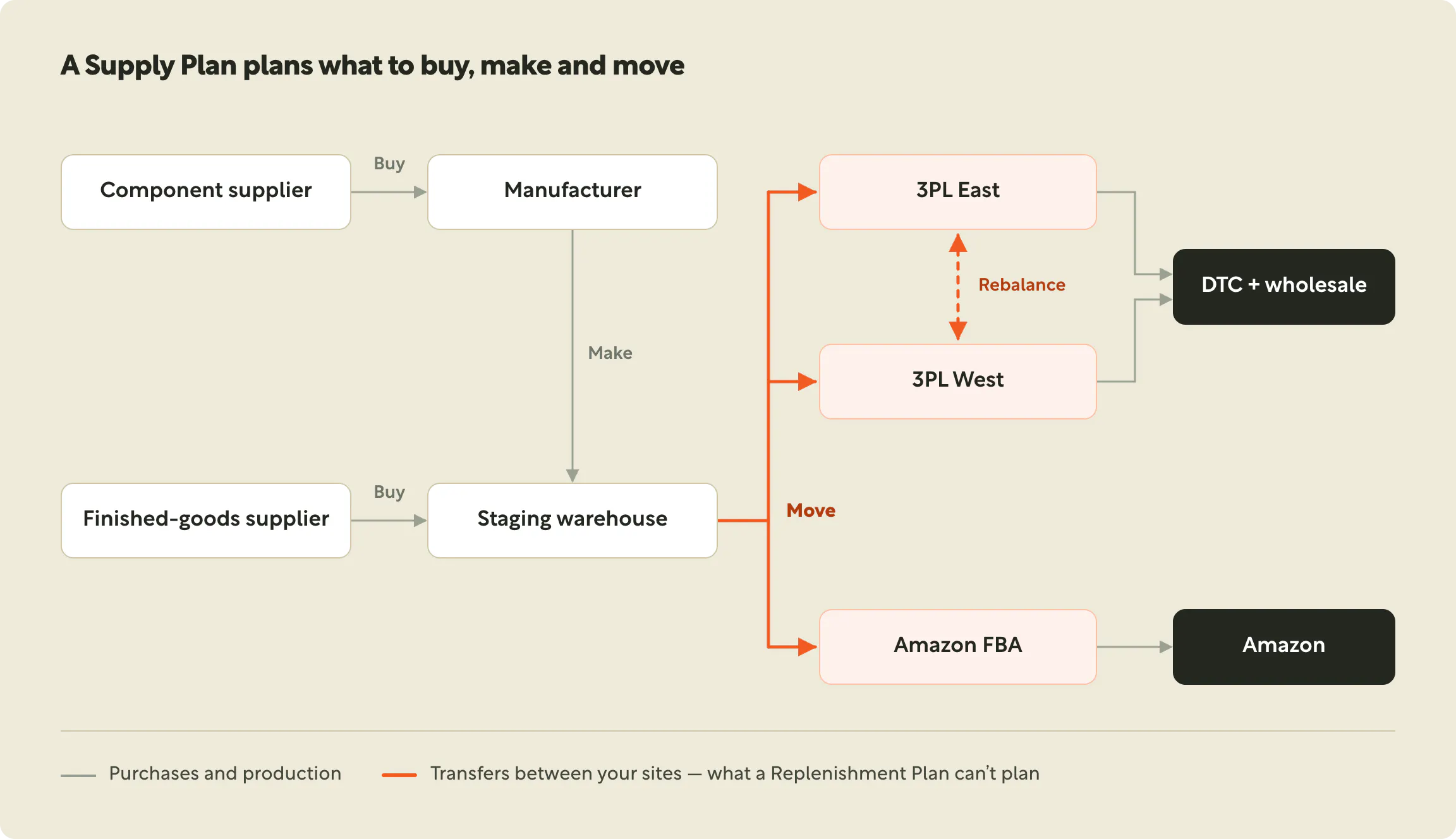
- Lead times that stack up. Component supplier to manufacturer, manufacturer to staging warehouse, staging warehouse to 3PL or FBA. Each hop adds days, and a spreadsheet rarely lines them up in the right order.
- Safety stock that drifts. Buffers set once in a sheet go stale as demand, seasonality and channels change.
- Planners stuck doing maths. The real value of a planner is judgement — which products to protect, which channel to prioritise — not rebuilding formulas every month.
Supply planning brings all of this into one view, so every decision is made with the whole network in mind.
How is supply planning different from replenishment and production planning?
The three terms often get used interchangeably, but they answer different questions:
- Replenishment planning answers "What should I buy?" It calculates how much to reorder for each location from your forecast, against lead times and minimum order quantities.
- Production planning answers "What should I make?" It schedules runs at your manufacturer or co-packer and works out the components and packaging each run needs.
- Supply planning answers "What should I buy, make and move — and where?" It brings purchasing, production and transfers together across your entire network.
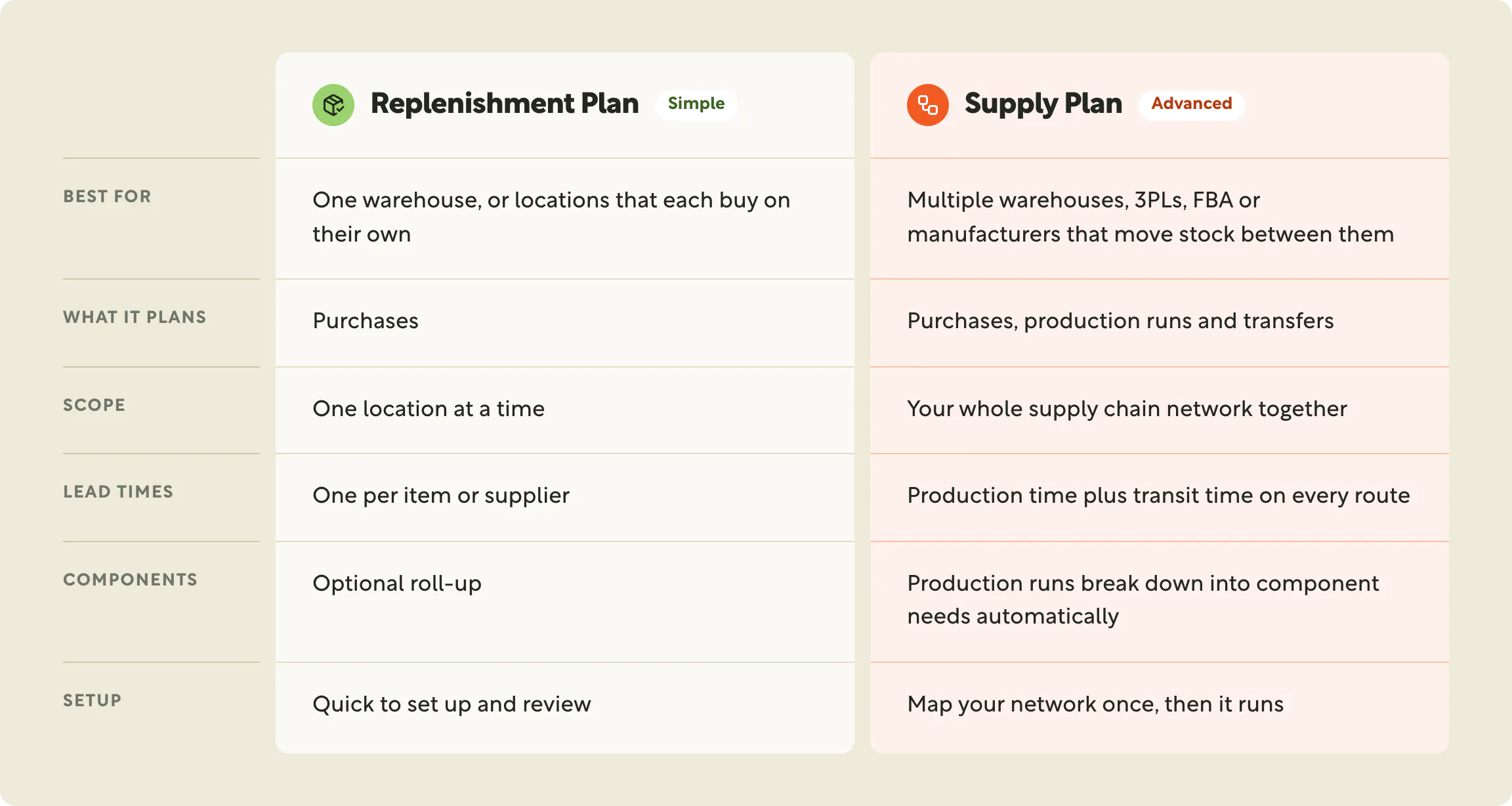
Which plan should you choose?
Ask yourself one question: does stock ever move between your locations?
- No — each warehouse is replenished straight from suppliers. Start with a Replenishment Plan. It's fast to set up, easy to review and gets purchase orders out the door.
- Yes — you have a staging warehouse feeding 3PLs, you top up Amazon FBA, you move stock across borders, or you run production that feeds multiple sites. You need a Supply Plan.
Many brands start with Replenishment and graduate to a Supply Plan as their network grows. Because both run on the same forecast and the same product settings, that move is simple.
How Moselle supports each
In Moselle, both plans start in the same place. Go to Production → Create Production Plan and choose the one that fits. Both run on your forecast, your supplier terms and the safety stock you set on each product.
Replenishment Plan: fast, focused buying
- Reorder quantities for every product, straight from your forecast
- At-risk items flagged before they stock out
- Minimum order quantities, min/max levels and lead times applied automatically, with rules at SKU, product type or product line level
- Optimise for speed (get stock sooner) or cost (protect cash flow)
- Plan to a budget and bulk-edit buys with Mo, Moselle's AI agent
- Generate purchase orders in one click
Supply Plan: your whole network in one view
- One schedule for every product, at every location, in every period — opening stock, demand, arrivals, transfers in and out, ending stock and days on hand
- Three kinds of suggested orders: purchases, production runs and transfers, each with order-by, ship and arrival dates. Production runs automatically break down into the components and packaging they need
- Built on your Supply Chain map: suppliers, manufacturers, warehouses, 3PLs and sales channels, linked by real transit times
- A clear workflow from Suggested to Staged to Placed, with purchase orders rounded to case packs and minimums
- Dedicated views for overview, monthly breakdown, days on hand, replenishment and transfers
Before you build: getting the foundations right
A plan is only as good as the data behind it. You can't just sync your systems and press build — a few foundations need to be in place first. The good news: you set them up once, and the Moselle team works through them with you during onboarding.
- Connect and sync your data (both plans). Sales, inventory and purchase orders from your store, marketplace, ERP or warehouse system. This gives Moselle your sales history and your true starting stock.
- Set up your product catalogue (both plans). Product types, bundles and kits linked to their bills of materials, and components. Clean products in means clean plans out.
- Set up your warehouses and inventory (both plans). Every location you hold stock in, with inventory matched to the right products.
- Connect each sales channel to the warehouse that fulfils it (both plans, essential for Supply). This is how demand lands in the right place.
- Build and approve your forecast (both plans, required). Every plan runs on a forecast that covers the planning period, usually your Master Plan.
- Add your supplier terms (both plans). Minimum order quantities, order multiples and production lead times for each supplier, so suggested orders are ones you can actually place.
- Set safety stock on each product (both plans, recommended). Without it, plans cover demand with no buffer.
- Complete your Supply Chain map (Supply Plan). Before you build a Supply Plan, map where every product comes from and how it moves: suppliers and manufacturers, the lanes between your sites, and the transit time on each. Then clear anything the map's Network problems panel flags, such as a channel with no warehouse or a location nothing can reach.
For a Replenishment Plan, steps 1–7 are enough to get started. For a Supply Plan, the Supply Chain map is the step that unlocks transfers and network-wide planning, so it's worth getting right.
Three ways Moselle's Supply Plan helps larger brands
1. Transfer planning: move before you buy
For multi-location brands, the cheapest unit of inventory is often one you already own — it's just in the wrong place.
Moselle's Supply Plan plans transfers alongside purchases and production. Map your network once on the Supply Chain map, with real transit times between each site. From then on, when one warehouse is running low and another has surplus, the plan suggests moving stock before you spend on new inventory.
- Priority-aware: when more than one site can supply a location, Moselle follows your preferred source first, then the fastest route.
- Realistic: ship and arrival dates come from your actual lane transit times, and lanes can carry an order multiple such as a full truckload.
- Focused: the Transfer view shows planners exactly what's moving in and out of every warehouse.
- Conversational: ask Mo, "How much should we transfer from Toronto to New York so we don't stock out? Focus on top sellers and show weeks of stock."
The result: less cash tied up in duplicate buys, and fewer stockouts in one region while another sits on extra stock.
2. Safety stock guardrails on every product, in every plan
Safety stock only works if it's applied consistently. In Moselle, it lives on the product itself.
Set a safety stock for each SKU in days of cover — 120 days for a hero product, just-in-time for a slow mover. Every Supply Plan and Replenishment Plan build then turns that buffer into units against each period's forecast. As demand rises for peak season, the buffer rises with it. When demand falls, so does the stock you hold.
- Built in: no separate safety stock spreadsheet to maintain. Every build respects it automatically.
- Updated in one sentence: tell Mo, "Give all our clips three months of safety stock," and it updates every matching product. Rebuild the plan and the new guardrail is in place.
- Visible across the network: stock policies on the Supply Chain map add min/max cover and service-level targets by product and location, so risk is flagged early.
3. AI-powered supply planning, end to end
Your planners should be making decisions, not maintaining formulas. Moselle handles the maths at every step.
- Forecast with AI: a range of forecasting models, from proven statistical methods to fine-tuned AI foundation models, using signals like promotions and stockout history.
- Plan with regression: the Supply Plan's Simple regression engine works through every period and every location, suggesting the purchases, production runs and transfers needed to meet demand plus safety stock — while respecting lead times, minimum order quantities and case packs.
- Explain and act with Mo: ask Mo why an order was suggested, change it, stage it, or place a batch of orders in a single request, with a confirmation before anything is placed.
- Stay current: every build is saved as a version, and the plan tells you when it's out of date because forecasts, purchase orders or your network changed.
Planning becomes a strategic conversation instead of a monthly spreadsheet rebuild.
Ready to plan your whole network?
Supply planning is now available to every Moselle customer.
- New to Moselle? Book a demo and we'll map your network — warehouses, 3PLs, Amazon FBA and manufacturers — and show you what to buy, make and move. [Book a demo]
- Already a customer? Go to Production → Create Production Plan → Supply Plan, or ask your Moselle team to help map your supply chain.
- Not sure which plan fits? Remember the one-question test: if stock moves between your locations, you need a Supply Plan.
Related reading: Supply Planning guide · Supply Chain Network guide · Mo key capabilities