release notes
Know Which Calls to Trust with Mo Confidence
Lakhveer Singh Jajj

September rebuilds Pulse Check around Mo Confidence — every call now carries how sure Moselle is of it, so a list of problems becomes an order of work. Plus the difference between a replenishment plan and a supply plan, and how a plan now carries straight through into the purchase order itself.
Pulse Check Now Tells You How Sure It Is
Pulse Check is the page you open first thing in the morning. It reads across your sales, your stock and your orders overnight and tells you which products and which purchase orders need a decision today. It launched in June, it was useful, and it had exactly the flaw above: a flat list, every row equally loud.
It's been rebuilt. Every row still opens with an outlook — reorder now, likely stock-out, likely late — and now carries Mo Confidence beside it: how sure Moselle is of that specific call, from 50% to 100%.

The same call reads differently at different confidence. Reorder now at 90% is today's work. The same reorder now at 55% is worth two minutes of checking first. Can wait at 95% needs nothing from you at all.
- Four questions, answered every morning. Will this SKU hit the forecast, will it run out in the next 30 days, does it need a purchase order now, and will that order land on time. Riskiest rows on top, each in its own card.
- Stock-out risk now reads the whole chain. A location isn't judged on its own stock alone — what's inbound, what's moving between your sites and what each channel pulls all count, so the warning fires on the SKU that's genuinely exposed rather than on every low number.
- From a row to a decision. Filter by product, location or channel. Switch Projection Confidence to a scatter and the genuinely odd SKUs separate from the pack instead of hiding in a sorted list. Ask Mo about any row without leaving the page.
Replenishment or Supply Plan?
In August we shipped the Supply Chain map — a canvas where you draw your actual operation: which supplier makes what, which warehouse it lands in, which of your sites can ship to one another, and how long every one of those moves takes. The question that came straight back, from a lot of people: so which plan should I be running now?
Moselle has two. Both start from the same demand forecast and both end in purchase orders. The difference is how much of your operation each one is allowed to consider.
- Replenishment Plan: “How much of this should I reorder?”
One warehouse at a time, purchases from suppliers, one lead time per item. Right for straightforward reorder cycles and single-site businesses, and it needs nothing more than a forecast and your supplier lead times. - Supply Plan: “Where should it come from, where should it go, and when must I act?”
Every warehouse planned together, reading your map to know which site feeds which and how long each route takes. It needs that map and your supplier catalogues in place first.
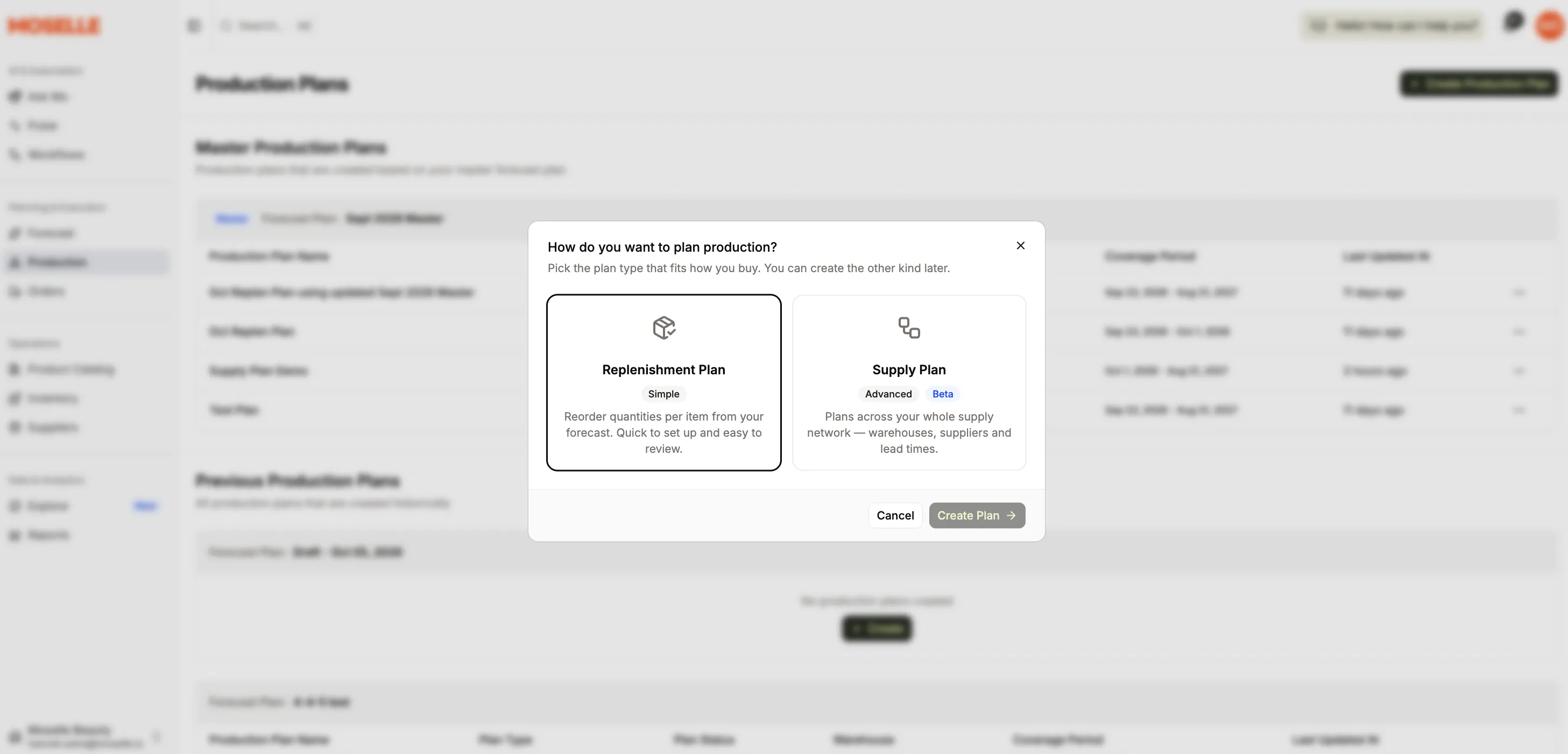
A replenishment plan can only tell you to buy more. A supply plan can tell you a shortfall in one warehouse is best covered by a pallet sitting in another, or by a production run at a co-packer — and when you supply the parts for that run, it reads the bill of materials and orders those too.
Every order it raises carries three dates: the day you have to order by, the day it ships, and the day it lands. The plan is organised around the first, because it's the only one still in your hands.
Learn more about Supply Planning →
The Plan Becomes the Purchase Order
Most planning tools hand you a recommendation and stop there: buy 400 units in March. Turning that into an order a supplier can work from means knowing their minimum, their case pack, your agreed price and the currency you buy in — knowledge that usually sits with one person who knows it well.
In Moselle it's recorded once against each supplier, and the plan carries straight through into the order itself.
- Every supplier sells on their own terms. A 500-unit minimum, cases of 24, six weeks to produce. Those sit on the supplier's catalogue and the plan reads them before it proposes anything, so what it proposes already fits.
- Including how and when you pay. Payment terms sit on the supplier, and the order is priced in their currency rather than converted into yours — so it reads the same at both ends, and cash planning knows when the money leaves.
- Then it leaves in one go. Push a batch of purchase orders into your OMS or accounting system at once. Orders belong to the company rather than the person who raised them, so a colleague can pick one up when someone's away.
Everything Else We Shipped
- Four more systems connect. BigQuery, Order Desk, easybill and Good Day. Fishbowl, which arrived last month, now reports live stock levels as well.
- Mo remembers what you've told it. Standing facts about how you operate — which site is the hub, which brands to leave out of a plan, whose lead times run long — used to live inside one conversation and leave with it. Once a week Mo now folds what it learned into what it knows about your business, so you say it once rather than every time. Opt in and we'll switch it on for your account.
- Booked orders show up in future months. If you sell wholesale, next quarter isn't really a forecast — a lot of it is already on paper. Turn it on and confirmed orders appear as actuals in future months, beside the forecast rather than instead of it, so you can see how much of the number is already sold.
- Bring a whole supplier list in from a file. Upload suppliers or a price list, see exactly what will change before anything is written, and start the whole thing by handing the file to Mo.
- Pull the catalogue, not just the sales. Sync Shopify products straight into your items and suppliers, carrying product status and vendor across — a much shorter first day for anyone setting up.
- Mo answers faster and spends less getting there. Fewer round trips on the analysis it writes, and the conversation is cached between steps rather than re-sent — so a long thread stays quick and your credits go further on the same work.
- One product filter, everywhere. Product and SKU filters merged into a single faceted picker whose options narrow as you choose, now on the forecast, the supply plan and saved views alike.
- A rebuilt create-forecast flow. The wizard was reworked end to end, and companies that plan by something other than category can now group a forecast by their own keys.
- Supply plans tidy up after themselves. Archive the plans you're done with, filter the grid by SKU grade, and save a column layout to a view so the plan opens the way you left it.
- Three reporting fixes worth naming. Sales Performance was reading a date range a month out, Historical Inventory sorted its month columns alphabetically, and custom report pivots could fall over on wide data. All three are fixed.
One More Thing
The hardest thing to earn in planning software isn't accuracy. It's being believed. A number with no uncertainty attached asks you to either trust it completely or check it completely, and most planners I talk to have quietly settled on checking it completely — which is the expensive option, and the reason the spreadsheet never quite goes away.
Showing you how sure we are is us doing the less flattering thing. Some rows will say 55%, and they should.
New to Moselle? Bring the spreadsheet you check every morning, and we'll show you what it looks like when the software tells you which lines actually need you. Book a demo.
Already with us? Pulse Check is live for everyone — it's under Pulse in the sidebar, right below Ask Mo. And if you mapped your supply chain last month, a supply plan is the natural next thing to try.