news
Mo Runs Supply Chains: Meet Mo Workflows
Hannah Astra, Director of Growth
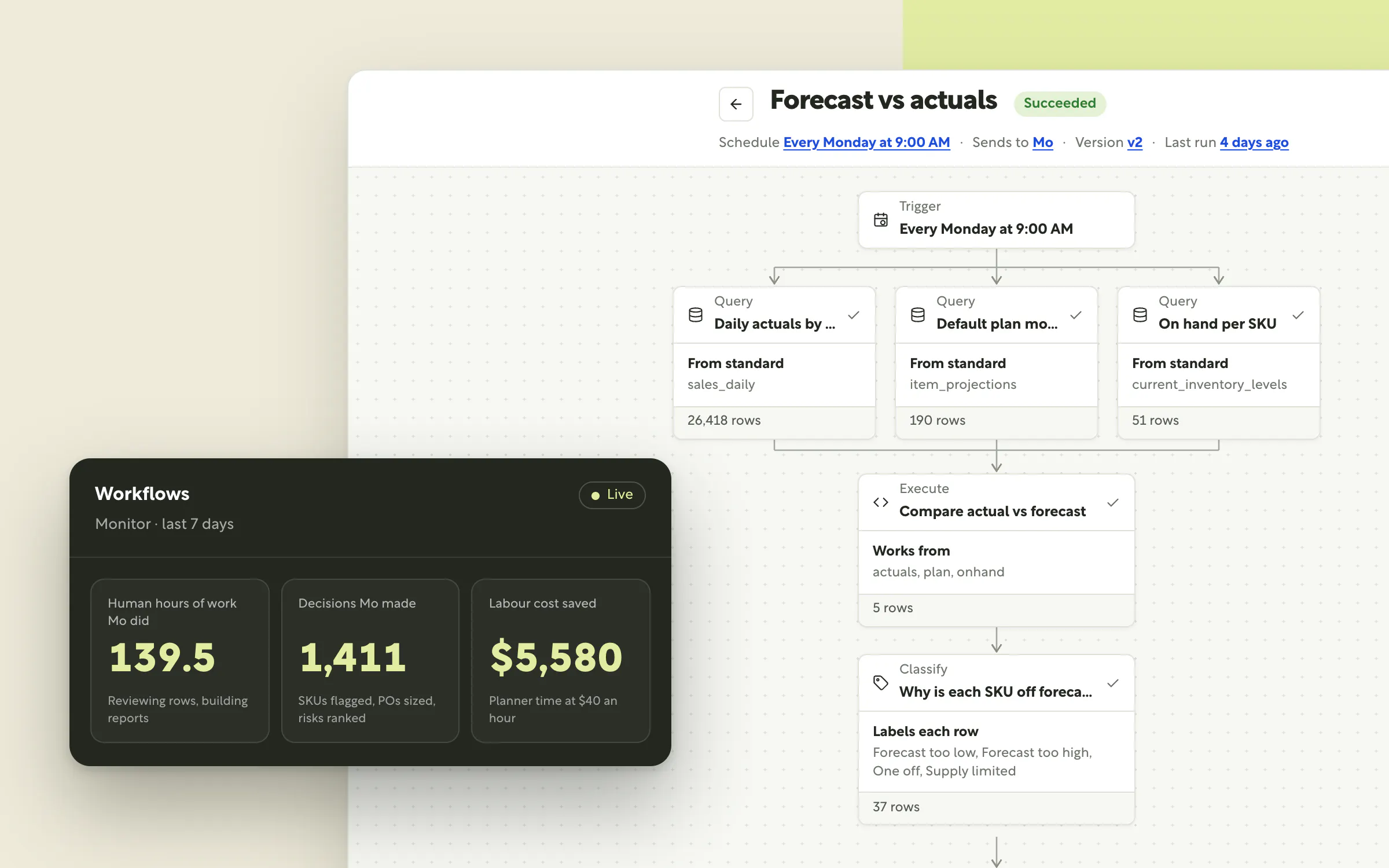
Forecast, plan, buy. Mo does the work.
For decades, planning software has made the same promise: get all your data in one place, and you'll make better decisions. It only ever kept half of it. The data moved into one place, but the decisions still waited on a person to log in, pull the numbers, spot the problem and work out what to do next.
Demand doesn't wait for that person. A shipment slips, a product goes viral, returns spike, and by the time someone opens Monday's report, the moment to act has passed. You can't watch your inventory all day. Until now, neither could your software.
Mo Workflows change who does the work.
Instead of software that shows you the work to be done, Mo is a teammate who does it. He reads your live data, runs the analysis, makes the routine calls, explains his reasoning and, once you approve, changes the plan himself. He doesn't log off, and he doesn't forget the Monday report. This is step one toward artificial supply chain intelligence: planning that runs itself, with your team in charge of the calls that matter.
Why does planning still run on people pulling reports?
Every growing brand hits the same wall. SKUs multiply, channels multiply, a second warehouse opens, and the planning team doesn't grow with it. The weekly stock check becomes a daily one. The spreadsheet that worked at 200 SKUs collapses at 2,000. Your sharpest people end up spending their best hours exporting, reconciling and rebuilding the same numbers.
The cost isn't only the hours. It's the timing. Problems surface after the moment to fix them has passed, like learning you'll be out of stock in April just after placing your May POs, or finding the cash tied up in slow movers a quarter too late.
The usual fixes haven't helped. Threshold alerts fire so often that teams learn to ignore them. Chatbots working off last week's export give a different answer every time you ask, which is no foundation for a buy plan. Brands don't need more dashboards or more alerts. They need someone to do the work.
What is a Mo Workflow?
A Mo Workflow is a unit of real supply chain work that Mo does for your company, on repeat. You start from a template or create your own, by chatting with Mo. Mo turns it into a chain of steps, proves it on your live data, and runs it from then on.
That difference matters more than it sounds. A prompt is a question you have to remember to ask. A workflow is a job Mo has taken on. Each step hands off to the next, from live data to a finished plan, without anyone pushing it along. Every step is saved and re-run exactly, so the numbers hold up run after run, and finance and ops can act on them with confidence.
It runs on live, connected data. Channels, inventory, POs and forecasts sync in continuously, so Mo is never working from a stale export.
It runs without a reminder. Every workflow is scheduled and monitored. If a step breaks, Mo pinpoints it and proposes the fix, so the work keeps going even when your team is buried in a launch.
It acts once you approve. Every run ends in a call: what Mo recommends, how sure he is, and why. Say yes, and he carries it out.
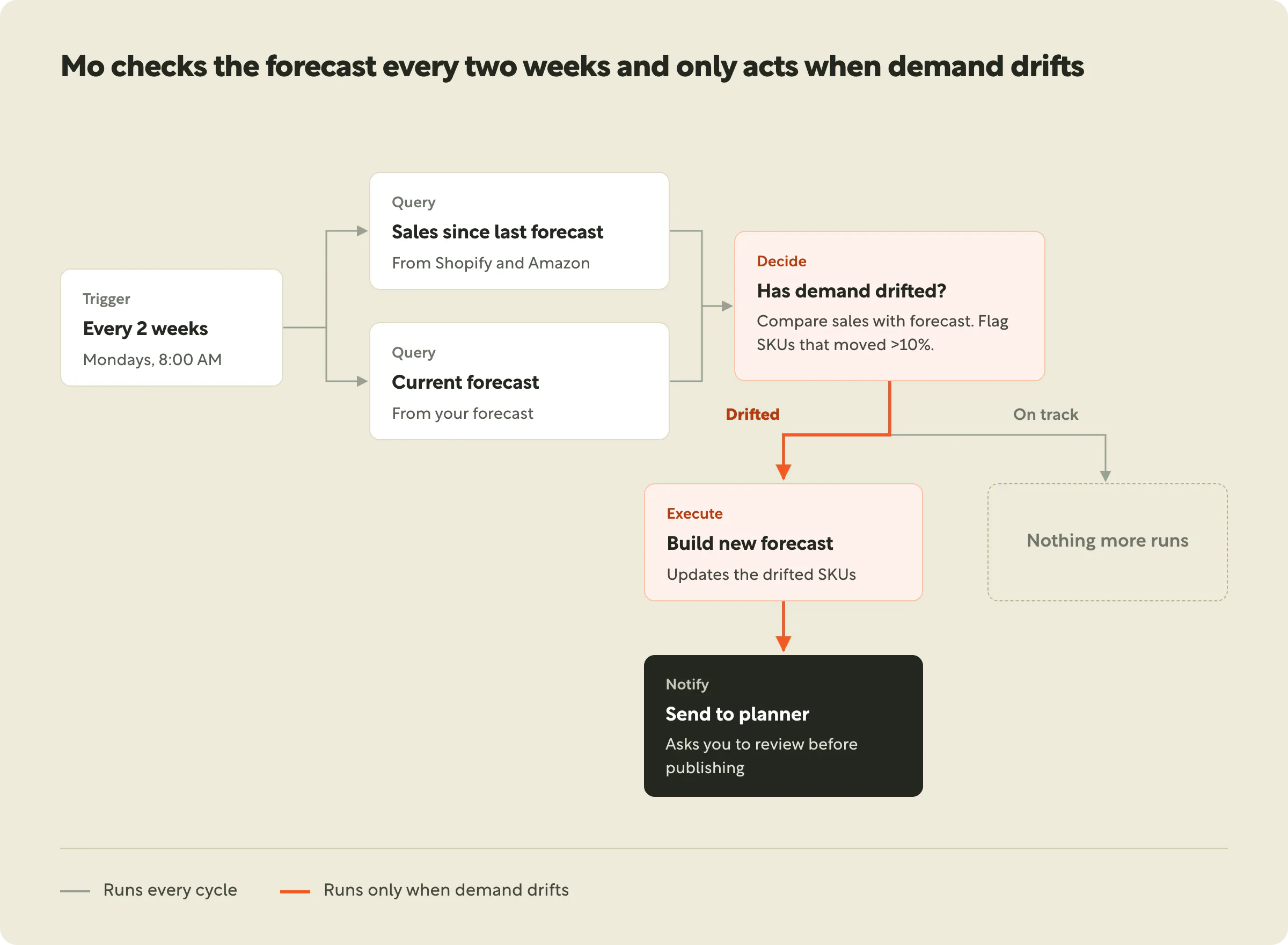
Take the Reforecast workflow above. Every two weeks, Mo pulls sales since the last forecast and compares them with your plan. If demand has drifted, he builds the new forecast and sends it to your planner to review. If everything is on track, nothing more runs, and nobody gets an email they don't need. That's the difference between an alert and a teammate.
How does Mo take on your team's work?
Teach him once. Mo works from what your team already knows: your synced sales, inventory, POs and forecast, plus the supply chain map and planning guidelines you've set up in Moselle. You never re-explain your business, and Mo never forgets it.
Hand it off. Ask for a reforecast, a buy plan or a supplier check, the same way you'd brief a colleague. Mo drafts the workflow in chat and runs it on your real data so you can see exactly what you'll get. Nothing goes live until you choose Save & schedule.
Let it run. From then on, Mo does the job every day, week or month, or the moment the data he's watching changes. He updates the analysis, makes the routine calls, and pulls you in only when a call needs you.
What Mo needs from you. Like any new teammate, Mo is only as good as the context you give him. Set this up once, and the Moselle team helps during onboarding:
- Connected sales and inventory data (every workflow). Shopify-based templates work as soon as a store connects.
- A clean item catalog (inventory, purchasing and forecast workflows), so SKUs line up across channels and locations.
- Purchase orders, suppliers and lead times (supply planning workflows).
- A forecast (demand planning workflows, and any workflow that revises a forecast).
- Bills of materials (Component needs).
- Advanced data setup for review and competitor signals.
What's the most ambitious work you can give Mo?
Most teams start where it hurts most: the report someone rebuilds every Monday. Templates like Weekly sales summary, Inventory snapshot and Stockout watch take that work off your plate in about 5 minutes, and alert-style workflows stay quiet until something needs action.
Then the work gets bigger. Mo stops summarising and starts recommending:
- Reorder plan by supplier sizes the buy.
- Transfer suggestions moves stock before a location runs short.
- Forecast accuracy and Demand anomaly check catch drift and explain it.
- Overstock and slow movers shows you exactly where your cash is stuck.
And for brands selling on Shopify, Mo starts on day one. A forecast, cart size, bundles, discount impact, and returns and refunds are all ready as soon as a store connects.
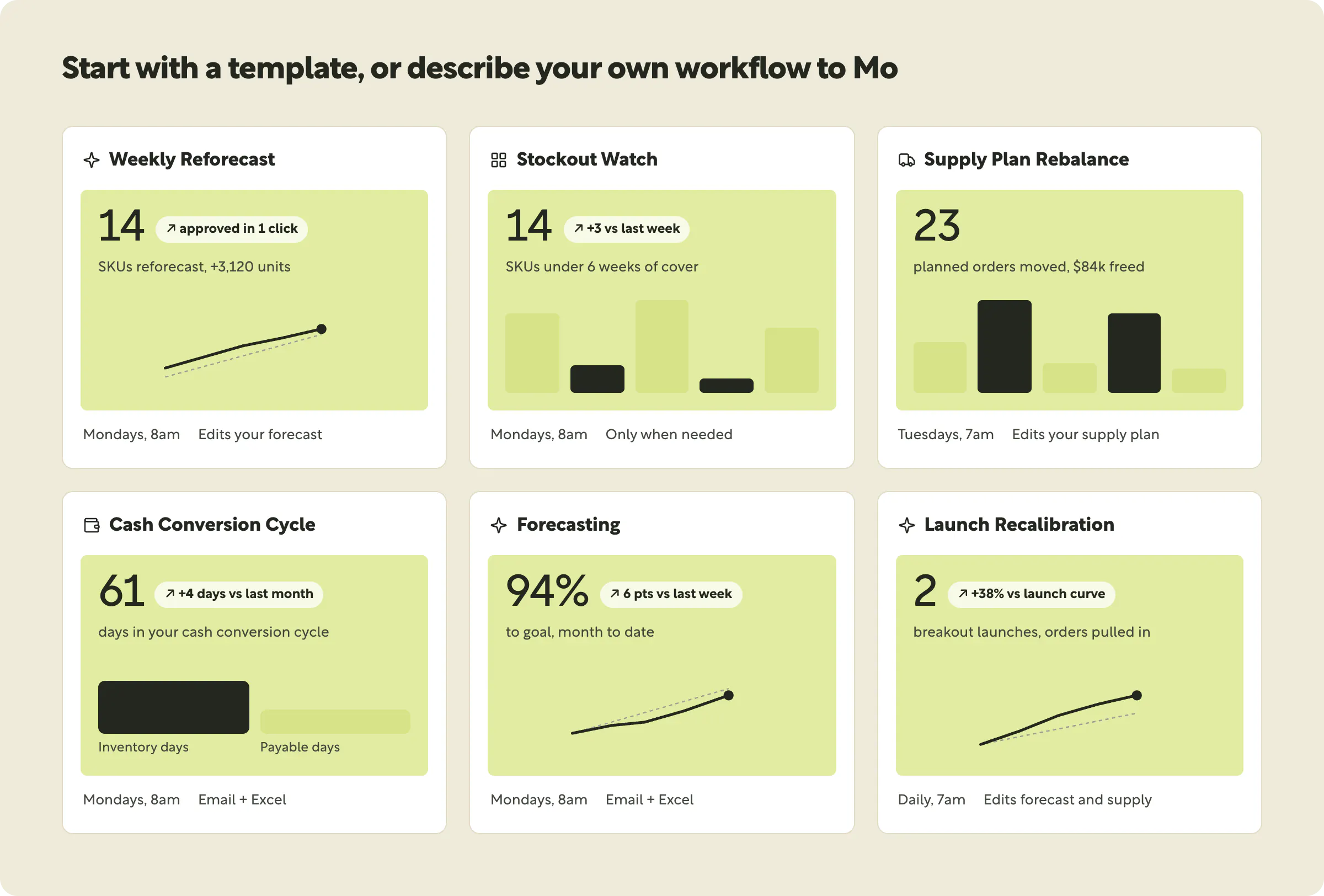
When Mo changes the plan himself
This is the shift that matters most. The most ambitious workflows don't end in an email. They end in a better plan.
Reports tell you what to do. Then someone still has to open the forecast, find the SKUs, make the edits and rebuild the supply plan. With these workflows, Mo does that part too. He drafts the change, shows you exactly what moves, and writes it to your forecast, supply plan or catalog once you approve. Every change traces back to the run that made it.
- Weekly Reforecast: Mo finds where the forecast keeps missing, sorts real shifts from promos, stockouts and bad data, and drafts the revisions.
- Supply Plan Rebalance: when demand moves, Mo pulls in, pushes out and resizes planned orders to match.
- Monthly Replan: on the first of the month, Mo builds a fresh forecast and supply plan with your rules for launches, promos and phase-outs. Your month starts with the plan done.
- Launch Recalibration: when a new SKU beats the curve of your past launches, Mo raises its forecast and pulls in the next order while there's still time to buy.
- Phase-Out Wind-Down: Mo trims the orders you no longer need, takes the forecast to zero after the phase-out date, and lists any stock you'll be left holding.
- Catalog Cleanup: Mo archives items your source systems dropped and fixes drifted details like cost and price, so plans stop counting SKUs that no longer exist.
Describe any of these to Mo in plain English, and he'll build it on your data. This is what planning looks like when the software doesn't just inform the work. It does the work.
Decisions made, reasons shown
Handing real work to an AI only works if you can trust it. That's why Mo never acts as a black box.
Every decision comes with its reasoning. Reorder or wait? Has demand drifted? Mo makes the call, tells you how confident he is, and shows the evidence behind it. Each workflow opens as a step-by-step flow, so you can follow any result back to the data and the step that produced it, and open any past run exactly as it was.
You stay in control of what changes. Add an approval step, and Mo waits for a yes from your team before he writes anything to your forecast, supply plan or catalog. If a step ever breaks, Mo names it and proposes the fix, and you approve it in one click. It's the same way you'd review a colleague's work, except Mo shows his working every single time.
Watch Mo go, day and night
Most software asks you to take its value on faith. Mo shows you his.
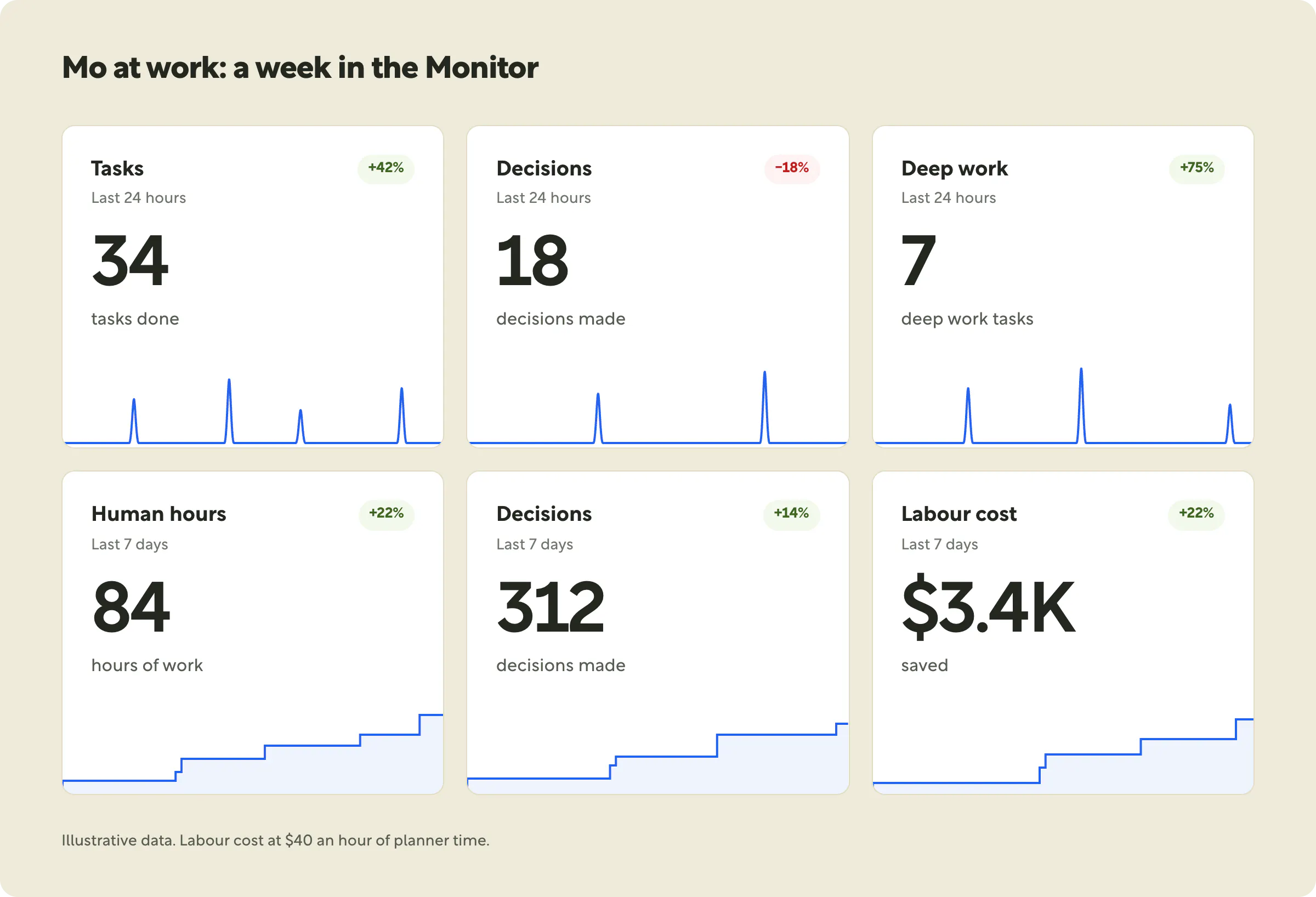
The Workflows page opens with Mo at work: the tasks he's done, the decisions he's made and the deep work he's completed in the last 24 hours. Done by Mo scores every run for the hours it saved, the decisions it made and the money at stake. The Monitor tab rolls it all into one live view that climbs as each run lands. It's a running tally of the work your team didn't have to do.
Intelligence beyond your four walls
Demand shifts rarely start inside your systems. They start with a wave of reviews, a competitor's price cut, or a retailer's shelf. Mo can watch there too.
Workflows can bring retailer reviews in alongside your own sales and inventory, and keep a running log from run to run. Customer review sentiment and competitor price comparison are rolling out now; contact support to turn them on. Mo connects those signals to your plan, so a SKU whose reviews are turning gets flagged before its sales drop, not after.
The planning team of the future
The best planners shouldn't spend their week building reports. They should spend it on the calls only people can make: which supplier to bet on, which launch to back, where to put the cash. Mo Workflows make that possible. Mo takes the repeatable work, runs it day and night, and brings you the decisions that need you.
Start with one job. Before long, Mo is running the work across your whole supply chain.
Give Mo context. He does the work.
- New to Moselle? See a demo and watch Mo run a workflow on your own data.
- Already a customer? Open Workflows in the left nav, pick a template, and click Use template or pop out Mo. Your first workflow can be running in about 5 minutes.
- Not sure where to start? Think of the report someone on your team pulls every Monday. That's Mo's first job.
If your team does it on repeat, Mo can do it for you.